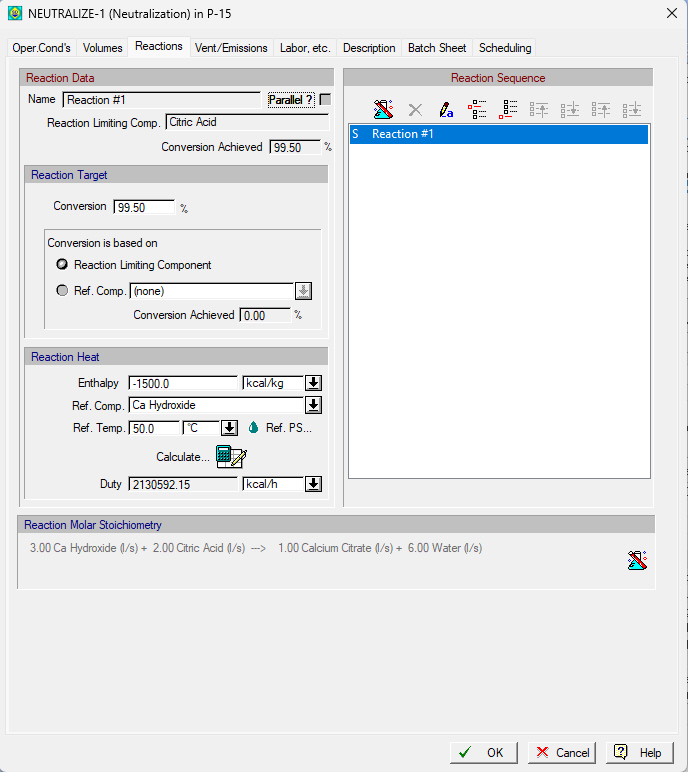
This tab appears on the interface dialog of the Neutralization operation.
The following table shows a brief description of the variables appearing in this tab. The table also displays their default values and their generally acceptable range:
|
Variable |
Default Value |
Range |
|
|
||
|
● Reaction Name |
Reaction #1 |
User Defined Text |
|
○ Parallel? |
No |
Yes/No |
|
● Reaction-Limiting Comp. |
<none> |
Any Pure Component |
|
● Reaction-Limiting Comp. Conversion Achieved (%) |
0.0 |
0-100 |
|
◙ Conversion (%) |
0.0 |
0-100 |
|
○ Ref. Comp. |
<none> |
Any Pure Component |
|
● Ref. Comp. Conversion Achieved (%) |
0.0 |
0-100 |
|
○ Unknown Reaction Heat |
No |
Yes/No |
|
○ Enthalpy (kcal/kg) |
0.0 |
Any Value |
|
○ Reference Component |
<none> |
Any Pure Component |
|
○ Reference Temp. (oC) |
25.0 |
Positive |
|
● Duty (kcal/h) |
0.0 |
Any Value |
Symbol Key: ○ User-specified value (always input); ● Calculated value (always output); ◙ Sometimes input, sometimes output
The following list describes the available specification choices in this tab; for more details on how these are implemented, please view see Stoichiometric Reaction Operations: Modeling Calculations.
•Parallel Reaction...
You can select whether reactions occur in parallel or sequentially. For reactions taking place in parallel the specified reaction extent is applied to the material amounts as existing at the beginning of the parallel. Notice that, in order for a parallel scheme to be meaningful, all reactions should have at least one common component with another reaction. Otherwise, the parallel scheme specification will not be allowed by the program. Note that this option is not available in the case of the Continuous Stoichiometric Reaction in an Electrowinning Cell.
•Conversion...
It represents the fractional conversion of the limiting or reference component. The limiting component for each reaction is displayed under the reaction name. If the conversion is specified based on a reference component and its value is not feasible, the program will use the max possible value (corresponding to extent of 0 or 100%). The conversion achieved is displayed in the dialog.
•Reaction Heat...
Use negative enthalpy values for exothermic (heat releasing) reactions and positive for endothermic (heat absorbing). You can either supply a value here at a given reference temperature and along with the assumed state of participants or you can invoke the Reaction Enthalpy Calculator by clicking on the  button. This button will bring up the Reaction Enthalpy Calculator Dialog interface which allows you to estimate the reaction enthalpy (heat of reaction) based on the formation enthalpies of its participant (reactants and products). Notice that you cannot invoke the Reaction Enthalpy Calculator if:
a) a reaction enthalpy reference component has not been selected or,
b) at least one reaction participant component is in the vapor phase at the enthalpy of formation reference temperature (i.e., its normal boiling point is below 25°C) and its vapor parameters have been declared to be ‘Unknown/Irrelevant’.
•Assumed PS of Reaction Participants
SuperPro Designer offers the option to specify the physical state of the reaction participants (at the reaction reference temperature) that corresponds to the user-defined reaction enthalpy. By default, the physical states of the participating components are inferred by the normal boiling point criterion at the reaction reference temperature. Click on the button  to view and edit the physical state of the reaction participants. Please see Reaction Participants PS Dialog.
•Reaction Sequence...
You can use the following buttons for editing / rearranging reactions:
 to view/edit the reaction stoichiometry of the selected reaction
 to delete the selected reaction,
 to rename the selected reaction,
 to insert a reaction above the selected one,
 to add a reaction at the end of the sequence,
 to move the selected reaction up in the sequence,
 to move the selected reaction down in the sequence,
 to move the selected reaction to the top of the sequence, and
 to move the selected reaction to the bottom of the sequence.
For information on reaction stoichiometry, see Reaction Stoichiometry Balance Dialog.