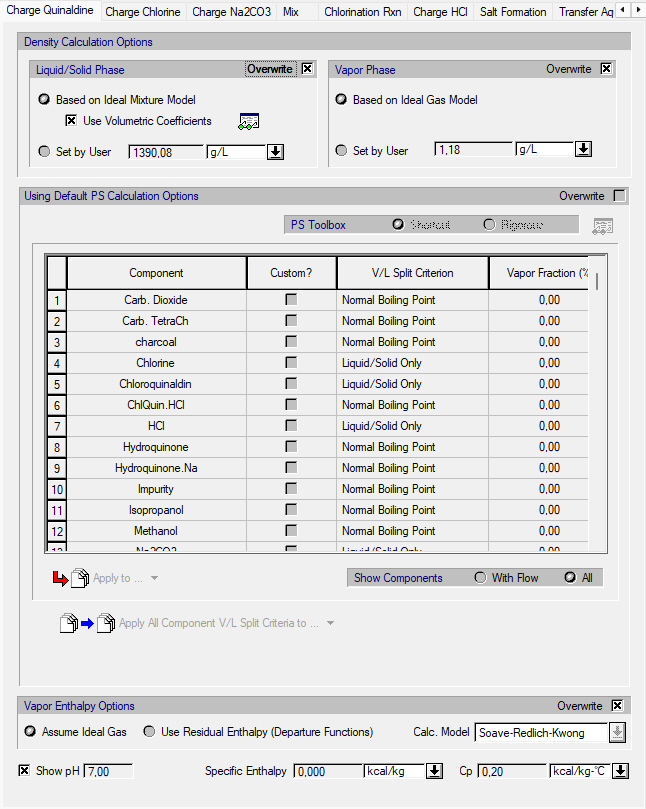
This dialog appears when you select Procedure State Prop Calc Options on the context menu of a unit procedure. Each tab in this dialog corresponds to one of the operations in the procedure. From this tab you can view and edit how SuperPro Designer calculates the physical state and the liquid/solid and vapor phase density of the equipment contents at the end of the corresponding operation.
|
|
To modify the physical state and density calculation options of material at the beginning of an operation you need to visit the tab of its preceding operation. If the material is loaded to the vessel via an automatic pull-in through the default port, then an extra tab would be inserted in the beginning of dialog labeled ‘AFTER AUTO-INIT’. The settings in this tab refer to the PS and density calculation options right before the first operation in the unit procedure’s sequence is simulated. Finally, if the material is automatically pulled-out at the end of the procedure, an extra tab is appended after the last operation labeled ‘END’. The settings in this tab refer to the PS and density calculation options for the material accumulated in the vessel after the automatic pull-out. |
Furthermore, this tab displays the average values of the Specific Enthalpy and Heat Capacity (Cp) of the contents, and also its pH (provided the respective option is enabled at the Document).
See also:
● Procedure State Physical State Calculation Options
● Procedure State Density Calculation Options
● Residual Enthalpy Calculation Options
● pH Calculation of Bulk Streams
