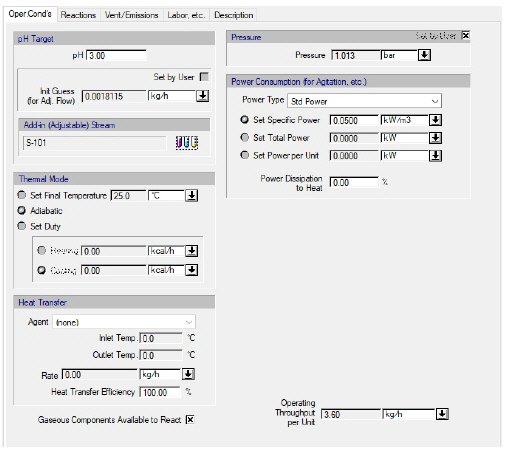
The following table shows a brief description of the variables appearing in this tab. The table also displays their default values and their generally acceptable range:
|
Variable |
Default Value |
Range |
|
|
||
|
○ Output pH |
7.0 |
|
|
○ Initial Guess Set by User |
No |
Yes/No |
|
◙ Initial Guess |
0.0 |
Positive |
|
◙ Final Temperature (oC) |
25.0 |
Positive |
|
◙ Heating Duty (kcal/h) |
0.0 |
Positive |
|
◙ Cooling Duty (kcal/h) |
0.0 |
Positive |
|
○ Heat Transfer Agent Name |
<Chilled Water> |
Any Heat Transfer Agent |
|
● Inlet Temp. (oC) |
5.0 |
Positive |
|
● Outlet Temp. (oC) |
10.0 |
Positive |
|
● Rate (kg/h) |
0.0 |
Positive |
|
○ Power Type |
<Std Power> |
Any Power Type |
|
◙ Specific Power (Per Volume) (kW/m3) |
0.1 |
Positive |
|
◙ Total Power (kW) |
0.0 |
Positive |
|
◙ Power Per Unit (kW) |
0.0 |
Positive |
|
○ Power Dissipation to Heat (%) |
100.0 |
[0,100] |
|
○ Pressure Set by User |
No |
Yes/No |
|
◙ Pressure (atm) |
1.0 |
Positive |
|
○ Allow for a Split After Reaction |
No |
Yes/No |
|
○ Gaseous Components Available to React |
Yes |
Yes/No |
|
● Operating Throughput per Unit (kg/h) |
0.0 |
Positive |
Symbol Key: ○ User-specified value (always input); ● Calculated value (always output); ◙ Sometimes input, sometimes output
•Component pH Data.
In order to calculate a meaningful value for the pH of stream the use has to provide the pH data of its components from the Pure Component: pH Data tab of the component registration dialog.
•Operating Throughput per Unit...
The operating throughput per unit is based on the mass flowrate of the output stream.
•Time Reference...
Choose the time reference for flowrate. The flowrate can be specified by the user to be per Batch, per Cycle, or per Time Average. Depending on whether the procedure is in batch mode or continuous, and the whether process is in batch mode or continuous, certain options may not be available. Specifically the availability of time reference flows depending on the mode of procedure / process is:
|
Process Mode |
Procedure Mode |
Time Reference for Flow |
|
|
|
|
|
Batch |
Batch |
Batch / Cycle |
|
Batch |
Continuous |
Batch / Time Average |
|
Continuous |
Continuous |
Time Average |
|
Continuous |
Batch |
Cycle / Time Average |
•Duration Options...
The duration controls appear only if the procedure is in batch mode. In Rating Mode, you can set the process time (and the setup time), allow the process time to be calculated (based on the throughput of the units), or allow the duration to match exactly the duration of another operation either in the same procedure or in another procedure. In Design mode, you must either specify the process time (and the setup time) or allow the duration to match exactly the duration of another operation (either in the same procedure or in another procedure).
If you choose to match the duration of this operation with the duration of another operation, you introduce a master-slave relationship between the two operations. The program will match the setup-time, the process time and the turnaround time of this operation (the ‘slave’) with the corresponding times of the reference operation (the ‘master’ operation). For more on master-slave relationship, see The Scheduling Tab.