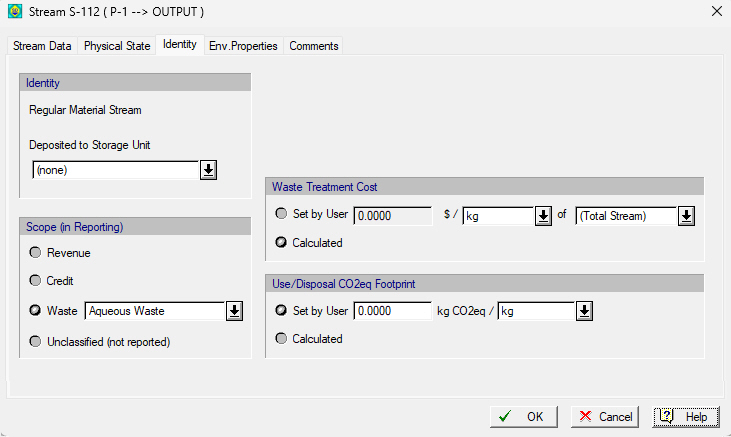
There are no choices for stream identity on a process output stream. All process output streams are ‘Regular Material Streams’.
All output streams’ identity is “Regular Material Stream”. There’s no other option. The only choice is to possibly associate the output stream with a collection (receiving) storage unit (see Material Storage Units) in order to have better accounting of output streams of the same fate (see Material Supply & Receiving Inventory Charts). For example, all cleaning outlets from CIP steps may be conveniently collected by a single receiving storage unit. Or, all SIP wastes may be collected together to a designated receiving storage unit.
Even though there is only one choice for identity for output streams, there is a choice for classification. Output streams can be classified as:
a) Revenue,
b) Credit,
c) Waste (Solid, Aqueous Liquid or Emission), or
d) Unclassified (not reported)
Most output streams are classified for economic purposes (scope) as “Unclassified” (implying that they are not contributing in any section of the ICR report). Only output streams attached to a port that is designated as an emission outlet port are automatically set as “Regular Material Streams” (as identity) but “Emissions” as classification category.
When choosing the classification of an output stream as Waste there are still 4 further designations you can choose: Solid, Aqueous (Liq), Organic (Liq), or Emission (Gas). When designating the classification of an output stream as (a), (b) or (c) above the associated unit revenue ($/kg) that will be taken as either income or credit as well the associated treatment cost ($/kg) that will be reported in the treatment cost, can either be calculated based on the corresponding value of each of the stream’s components, or it can be directly set by the user in the
|
|
If you designate an collection (receiving) storage unit to the output stream and that storage unit has a pre-assigned classification (e.g. “Organic Waste”) then the output stream’s classification will also become tied to the SU’s classification (“Organic Waste”) and cannot be changed from the Identity tab of the stream’s dialog or from the Stream Classification Dialog interface. |
Stream Classification Dialog interface.
You can change the classification of an output stream here or from the central table presented by the Stream Classification Dialog interface.
