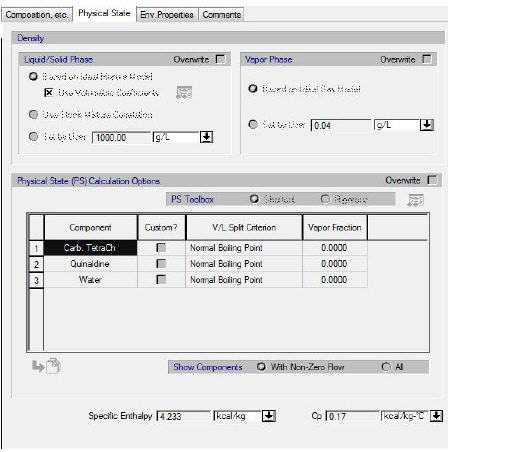
This tab is part of the Bulk Input Stream Dialog that appears if you right-click on an input stream and select Simulation Data from the context menu or if you double-click on an input stream on the flowsheet. From this tab you can view and edit how SuperPro Designer calculates:
1. the liquid/solid and vapor phase density
2. the physical state and
3. the vapor enthalpy calculation options
of input streams. Furthermore, this tab displays the average values of the Specific Enthalpy and the Heat Capacity (Cp) and pH of the stream (provided the respective option is enabled at the Document).
See also:
● Stream Physical State Calculation Options
● Stream Density Calculation Options
● Residual Enthalpy Calculation Options
● pH Calculation of Bulk Streams