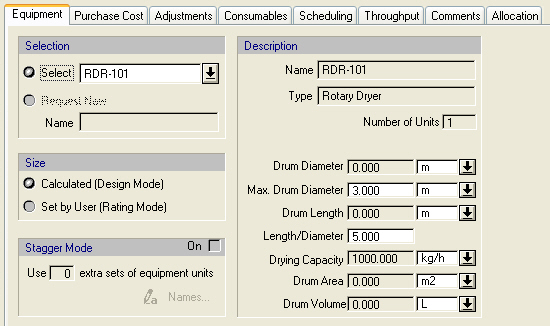
The following table shows the meaning of the variables appearing in this tab, as well as their default values and their generally acceptable range. Note that due to the manner by which the variables are used by the sizing and costing equations, the range of acceptable values may be further reduced.
|
Variable |
Default Value |
Range |
|
|
||
|
◙ Drum Diameter |
0.0 m |
Positive |
|
◙ Max Drum Diameter |
3.0 m |
Positive |
|
◙ Drum Length |
0.0 m |
Positive |
|
◙ Length/Diameter |
5.0 |
Positive |
|
◙ Drying Capacity rate |
1000.0 kg /h |
Positive |
|
● Drum Area |
0.0 m2 |
Positive. |
|
● Volume |
0.0 L |
Positive. |
Symbol Key: ○ User-specified value (always input); ● Calculated value (always output); ◙ Sometimes input, sometimes output
In Design Mode, the user specifies the evaporation rate (in kg evap./m3-h) and the system calculates the vessel volume by dividing the vapor mass flowrate by the evaporation rate. The Length/Diameter ratio is used to calculate the length and diameter of the vessel. If the calculated diameter exceeds the maximum, multiple units are assumed that operate in parallel.
In User-Defined (Rating Mode), the user specifies the Number of Units and the Drum Diameter and the Drum Length. The Drying Capacity is also specified and it is used to calculate the Equipment Capacity Utilization.
The equipment purchase cost is estimated using built-in correlations derived from vendor data. The equipment cost is a function of the drum diameter and length with a minimum diameter of 0.5 m and minimum length of 2.0 m.
For more information on this equipment, see Rotary Dryer.
For information on the left-hand side variables and options, see Equipment Data Dialog: Equipment tab.