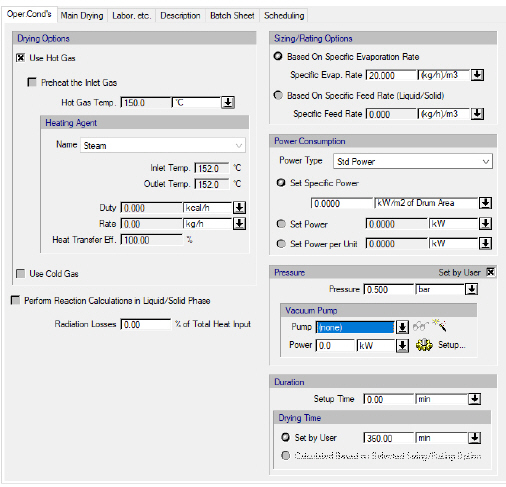
This tab appears on the interface data dialogs of the following operations:
The following table shows a brief description of the variables appearing in this tab. The table also displays their default values and their generally acceptable range:
|
Variable |
Default Value |
Range |
|
|
||
|
○ Volatile ? |
<No> |
Yes/No |
|
◙ Evaporation (%) |
0.0 |
0-100 |
|
● LOD Before Evaporation (%) |
0.0 |
0-100 |
|
○ LOD After Evaporation (%) |
5.0 |
0-100 |
|
● Primary Gas Out Dew Point (°C) |
25.0 |
Positive |
|
○ Entrainment (% of Dried Material) |
0.0 |
0-100 |
|
● Primary Gas In Stream |
<None> |
Dedicated Input Port |
|
◙ Relative Amount of (Heating or Cooling) Gas In Stream (wt Gas/wt Evaporation) |
8.0 |
Positive |
|
◙ Volatile Content of (Heating or Cooling) Gas Out stream (wt Volatiles/wt Non-Volatiles) |
0.02 |
Positive |
|
◙ Primary Gas Out Temperature (°C) |
70.0 |
Positive |
|
◙ Product Temperature (C) |
70.0 |
Positive |
Symbol Key: ○ User-specified value (always input); ● Calculated value (always output); ◙ Sometimes input, sometimes output
Specification Choices / Comments
The following list describes the available specification choices in this tab; for more details on how these are implemented, see Rotary Drying: Modeling Calculations.
•Volatile ?...
All volatile components that are removed (evaporated) during drying must be identified as such.
•Volatile Component Evaporation...
If the evaporation of volatile components is calculated by the program based on the specification of the “LOD After Evaporation” (loss on drying), it is assumed that all volatile components have the same evaporation percentage. If this assumption is not valid (i.e., the evaporation percentages of volatile components differ), you will need to manually set the evaporation percentage for each volatile components.
•View/Edit Composition Button for (Heating or Cooling) Gas In Stream...
Click on this button to specify the composition of the “Primary Gas In” stream (connected to the mid-input port).
•Primary Gas In Stream Flow Specification Options...
You can choose among four different options for specifying the flow requirement of the “Primary Gas In” stream: you can specify the stream’s flow directly (though that stream’s data dialog), the stream’s relative flow (ratio of the stream’s mass flow rate to the total evaporation rate), the volatile content of the “Primary Gas Out” stream (ratio of volatiles’ mass flow rate to non-volatiles’ mass flow rate in the “Primary Gas Out” stream), or the temperature of the “Primary Gas Out” stream.
Note that if the inlet gas is air, the value of the “Volatile Content of Primary Gas Out Stream” corresponds to the humidity of outlet air.
If one of the first three options is chosen, the program will first calculate the flow of the “Primary Gas In” stream. Then, it will solve the energy balance to calculate the temperature of the “Primary Gas Out” stream. If the fourth option is chosen, the program will solve the material and energy balances to calculate the flow of the “Primary Gas In” stream.